%20--%3e%3cdefs%3e%3cstyle%3e%20.st0%20{%20fill:%20%23fff;%20}%20%3c/style%3e%3c/defs%3e%3cg%3e%3cpath%20class='st0'%20d='M11.6,34.9v6.8c0,0,0,36.9,0,36.9v6.8c0,0-11.5,0-11.5,0v-6.8c0,0,0-36.9,0-36.9v-6.8c0,0,11.5,0,11.5,0ZM0,19h11.4v12.3H0v-12.3Z'/%3e%3cpath%20class='st0'%20d='M15,85.3v-6.8c0,0,0-52.8,0-52.8v-6.8c0,0,14.9,0,14.9,0,10.4,0,15.3,6.7,15.3,17.1v.2c0,6.9-2.2,11.4-6.1,14.1v.4c5,2.4,7.5,7.4,7.5,14.8v.2c0,12.9-6,19.7-16.5,19.7h-15.2ZM28.2,45.3h.3c2.9,0,4.5-3.3,4.5-7.7v-.3c0-4.4-1.6-7.1-4.5-7.1h-.3v15ZM28.7,74c3.4,0,5-3.2,5-8.6v-.4c0-5.3-1.8-8.4-5-8.4h-.5v17.4h.5Z'/%3e%3cpath%20class='st0'%20d='M53.4,82.4c-3.4-3.7-4.6-10.3-4.6-21.9v-16.6c0-11.6,1.2-18.2,4.6-21.9,2.2-2.4,5.6-4.1,11.2-4.1s9,1.7,11.2,4.1c3.3,3.6,4.7,9.9,4.7,21.9v16.6c0,12-1.4,18.3-4.7,21.9-2.2,2.4-5.6,4.1-11.2,4.1s-9-1.7-11.2-4.1ZM62,63.5c0,7.7,0,10.8,2.6,10.8s2.7-3.1,2.7-10.8v-22.7c0-7.7,0-10.8-2.7-10.8s-2.6,3.1-2.6,10.8v22.7Z'/%3e%3cpath%20class='st0'%20d='M97.4,63.3l-3.2,22h-14l8.4-35.3-8-31.1h13.9l3.1,19.8h.3l3.1-19.8h13.6l-8,31.1,8.4,35.3h-14.3l-3.2-22h-.2Z'/%3e%3c/g%3e%3cpolygon%20class='st0'%20points='121.6%200%2012.4%200%200%200%200%2011.4%20122.3%2011.4%20122.3%2092.9%200%2092.9%200%20104.3%2012.4%20104.3%20133.7%20104.3%20133.7%2012.4%20133.7%200%20121.6%200'/%3e%3c/svg%3e)
The iBox web app
Add iBox to your home screen
One-tap access to available units, estate details and brochures — no app store needed. Our site installs straight onto your phone like an app.
iPhone & iPad
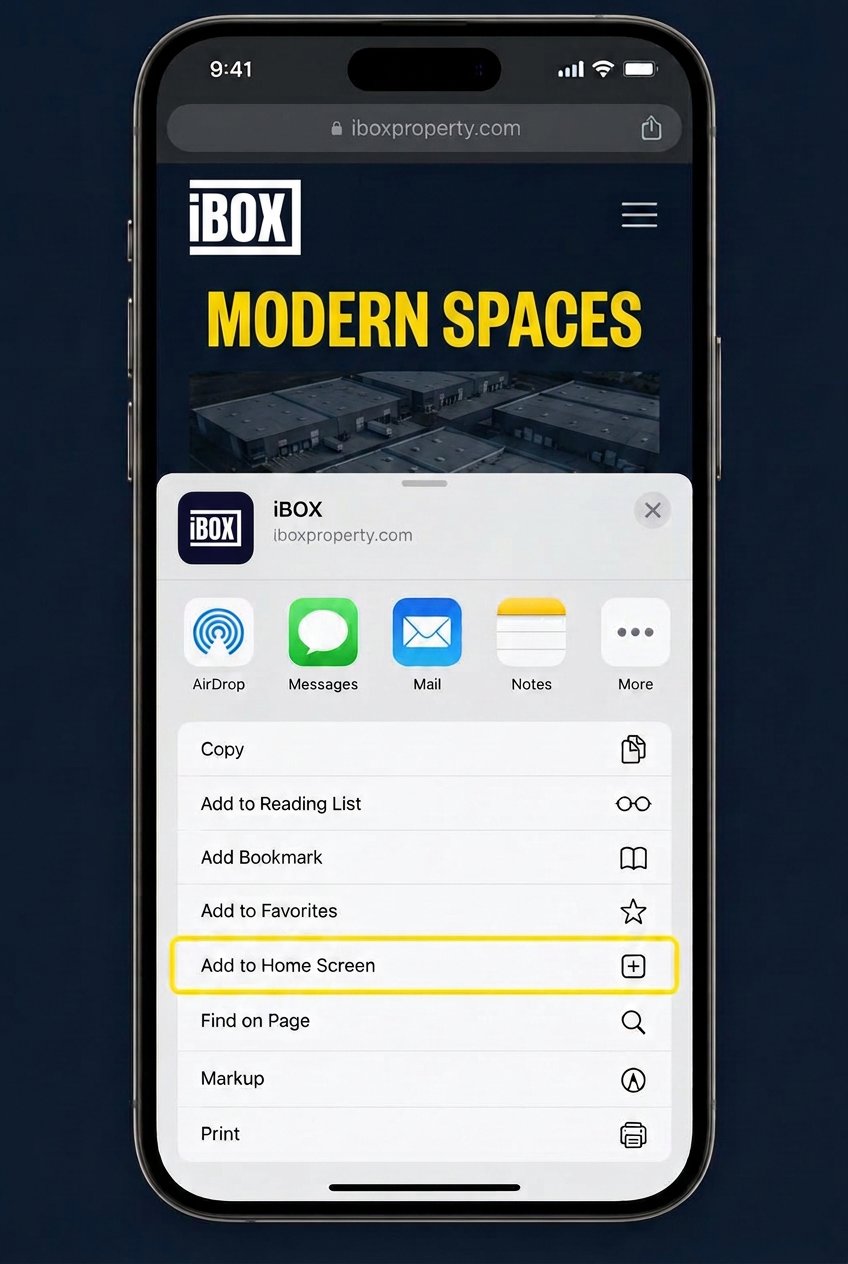
Install on iOS
- 1Open iboxproperty.com in Safari on your iPhone or iPad.
- 2Tap the Share button (the square with an arrow pointing up).
- 3Scroll down and tap “Add to Home Screen”.
- 4Tap “Add” — the iBox icon appears on your home screen.
Android
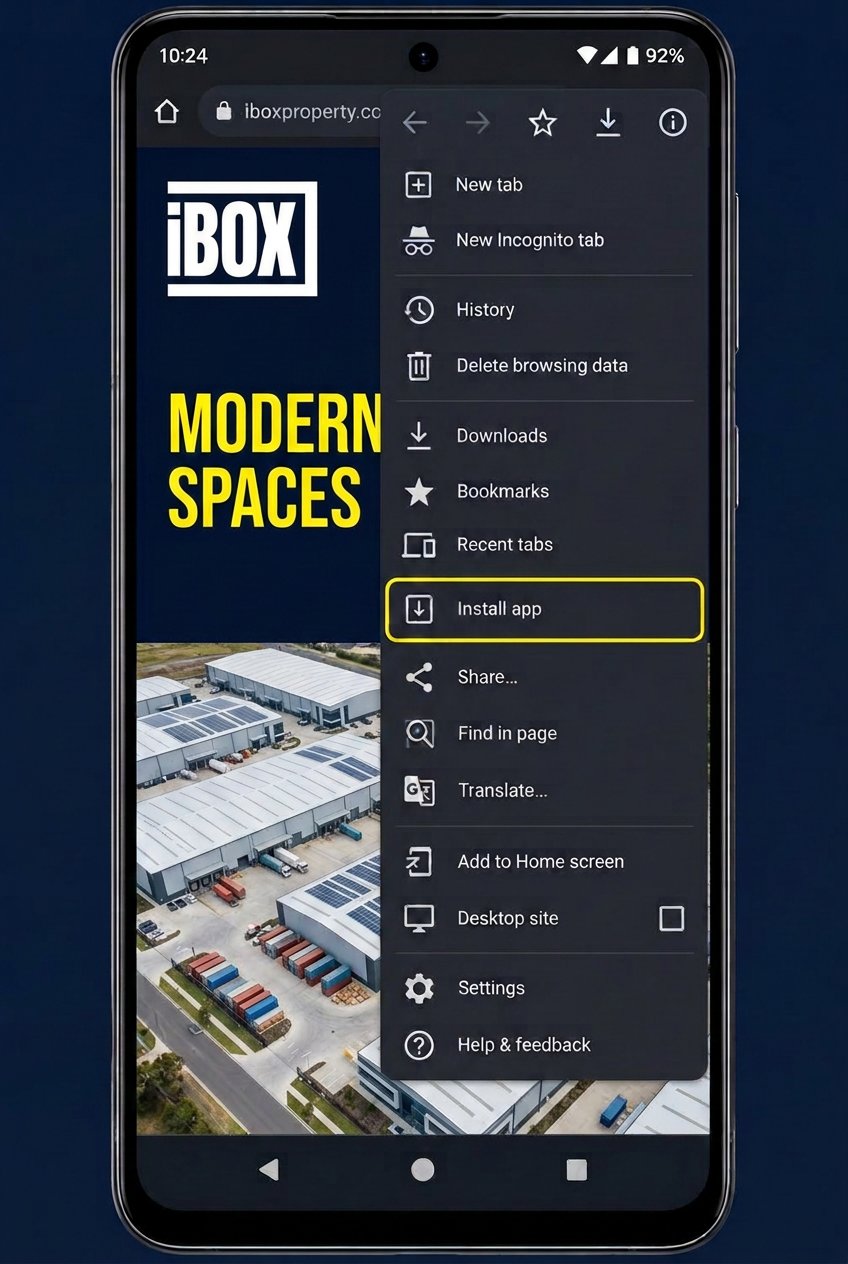
Install on Android
- 1Open iboxproperty.com in Chrome on your Android phone or tablet.
- 2Tap the three-dot menu in the top right corner.
- 3Tap “Install app” (or “Add to Home screen”).
- 4Confirm with “Install” — the iBox icon appears on your home screen.
Good to know
- On iPhone you need to use Safari — other browsers can't add to the home screen.
- The iBox logo becomes your app icon, and the site opens full screen without browser bars.
- Nothing to download from an app store, and you always see the latest availability.
- To remove it, press and hold the icon and delete it like any other app.